
PART ONE
PROJECT OVERVIEW
Abstract
Solution Engineers at Salesforce frequently configure and present product demos to customers, which requires a quick access to various resources spread across platforms like Quip, Slack Canvas, and Solutions Workspace. However, finding the right materials in context is often cumbersome, leading to inefficiencies. This extension introduces an expandable sidebar, seamlessly integrated within the Salesforce interface, surfacing relevant, contextual resources without disrupting workflow. By reducing search time and enhancing accessibility, the solution empowers Solution Engineers to build demos more efficiently, ensuring faster turnaround times and improved demo quality.

PROJECT OVERVIEW
The problem
Solution Engineers struggle to quickly find the right resources while building Salesforce demos. This results in - wasted time navigating multiple platforms, disrupted workflow due to constant switching between tools and inconsistent demo quality because of missing or outdated materials.
USER SENTIMENTS
01
"I waste too much time searching for relevant documentation and end up losing momentum while building demos."
02
"With so many resources scattered across different platforms, it’s difficult to know where to look first."
03
"I’m never sure if I’ve found the most up-to-date or relevant material for my demo."
PROJECT OVERVIEW
The solution
The Expandable Sidebar integrates within Salesforce Demo Orgs to contextually surface relevant resources from trusted sources, eliminating the need to search across multiple platforms.
ADDRESSING USER NEEDS
01
Context-Aware Resource Surfacing with AI: Automatically fetches relevant guides, templates, and best practices based on the active org and configuration.
02
Seamless Access & UI Integration: Users can expand or collapse the sidebar anytime via a simple lightning bolt icon, maintaining focus without disruption.
03
Single-Source Information Hub: Compiles resources from Quip, Slack Canvas, and Solutions Workspace into one unified panel.

PROJECT OVERVIEW
Role
UX/UI Designer
Timeline
3 weeks
Team members
Product Owner
UX/UI Designer
Developer
Responsibilities
Discovery through Surveys
UX Strategy
Responsive Design
PART TWO
DISCOVERY WORKSHOPS
UNDERSTANDING THE USER
Primary research
To refine the extension and ensure alignment with user needs, we propose conducting surveys targeting Solution Engineers.


UNDERSTANDING THE USER
Secondary research
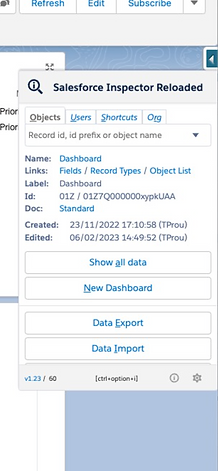
We did some research and came across some extensions that are currently used by Salesforce developers for development purposes in the platform.

UNDERSTANDING THE USER
Hero persona
Goals
-
Customer Success: Wants to ensure clients get the most out of the company’s solutions, leading to renewals and upsell opportunities.
-
Innovation: Always on the lookout for new technologies and methodologies to improve the efficiency and effectiveness of solutions.
-
Collaboration: Seeks to foster stronger relationships between the technical and sales teams to streamline the client engagement process.
Pain Points/Frustrations
-
Balancing Customization and Scalability: Needs to find the balance between creating custom solutions for individual clients while ensuring that the company’s core product remains scalable and efficient.
-
Client Expectations: Managing expectations of clients who may not understand the technical limitations or the timelines required for solution deployment.
-
Staying Updated: Constantly needs to stay up-to-date with evolving technologies, new tools, and industry trends to provide clients with the best possible solutions.
Motivations
"I pretty much live off of my task list, it tells me what to do, once you get it down it makes your life a lot easier if you just learn to use it correctly."
-
Problem Solving: Enjoys finding the perfect solution to complex problems and seeing the impact on a client’s business operations.
-
Professional Growth: Interested in gaining certifications and advancing in the field, potentially moving into more strategic roles such as Solutions Architect or Director of Engineering.
-
Customer-Centric Mindset: Driven by the desire to see clients succeed and ensuring they derive maximum value from the company’s products.
JTBD
The SEs come to the IDO home page to search for documentation and tools required to build the demo with much ease.
They would only want to interact with the Demo Support if they find themselves stuck somewhere while building the demo or are not able to work through the demo.
The Demo setup and configuration may be too complex to follow.
Might find it difficult to keep up with new demo-building tools
They don’t have time to spin up the demo and build it according to their needs because of short presentation deadline with the client.

.png)

1200+ more
Solution Engineers
Working at Salesforce
Acts as a bridge between the technical and sales teams, helping clients understand and implement technical solutions that align with their business goals using product demos and presentations.
DEFINITION
Key Features
Post defining the personas, we identified and determined the key features that would be implemented after discussing it with the stakeholders
AI-Powered Assistance Panel
Integrated AI Agent within the sidebar for real-time contextual recommendations. Enables natural language queries to fetch relevant resources, guides, and best practices. Provides personalized suggestions based on the active Salesforce page or demo configuration.
Expandable & Collapsible Sidebar
Minimalist UI design with a toggle button (lightning bolt icon) for quick access. Users can expand or collapse the sidebar to maximize screen space. Maintains state persistence, remembering whether it was expanded/collapsed between sessions.
Easy Way to deploy service agent bots
With just a couple of simple click and reducing any coding efforts, users could easily deploy chatbots on the customer platforms for demo purposes.
Context-Aware Resource Surfacing
Automatically surfaces relevant documentation, templates, and solution guides based on the user’s workflow.Pulls resources dynamically from Salesforce Solutions Workspace, Quip, and Slack Canvas.Reduces context switching by presenting all necessary information in one place.
Embedded Quick Actions & Navigation
Provides direct links to frequently used tools, eliminating the need to navigate through multiple tabs. Includes one-click access to pre-built demo templates and solution workspaces. Offers bookmarking or favoriting functionality for quick retrieval of important resources.
Interactive Notifications & Collaboration Tools
Displays real-time updates on new Salesforce feature releases, best practices, and documentation changes. Integration with Slack & Quip allows direct sharing of relevant materials. AI-driven proactive alerts inform users of missing or outdated demo assets.
PART THREE
STARTING THE DESIGN
Design explorations
STARTING THE DESIGN

STARTING THE DESIGN
Final Prototype Design

Conclusion
The release of the Expandable Sidebar for Salesforce Demo Orgs has led to a significant increase in user engagement and adoption, with Solution Engineers embracing the streamlined workflow and AI-powered contextual assistance. Post-launch analytics indicate a notable reduction in time spent searching for resources, translating into improved productivity and more efficient demo preparation.
User feedback has been overwhelmingly positive, highlighting the ease of access to relevant materials, reduced context-switching, and intuitive UI. Many Solution Engineers reported that the sidebar has become an essential tool in their daily workflow, accelerating demo setup and ensuring consistency.
Leadership has also recognized the sidebar’s impact, praising its efficiency in surfacing trusted resources, driving operational excellence, and enhancing the overall demo experience. With strong adoption rates and positive sentiment across teams, the sidebar has successfully positioned itself as a critical enabler for Salesforce demo success, setting the foundation for further innovations and AI-driven enhancements in the future. 🚀
